Android Launcher  ·  iOS Companion

Your phone is designed to steal your day.

Mono blocks distracting apps, silences your phone, and runs a Pomodoro timer – one switch, and the phone is finally on your side. Android launcher. iOS companion.

No account needed No subscription Nothing leaves your device
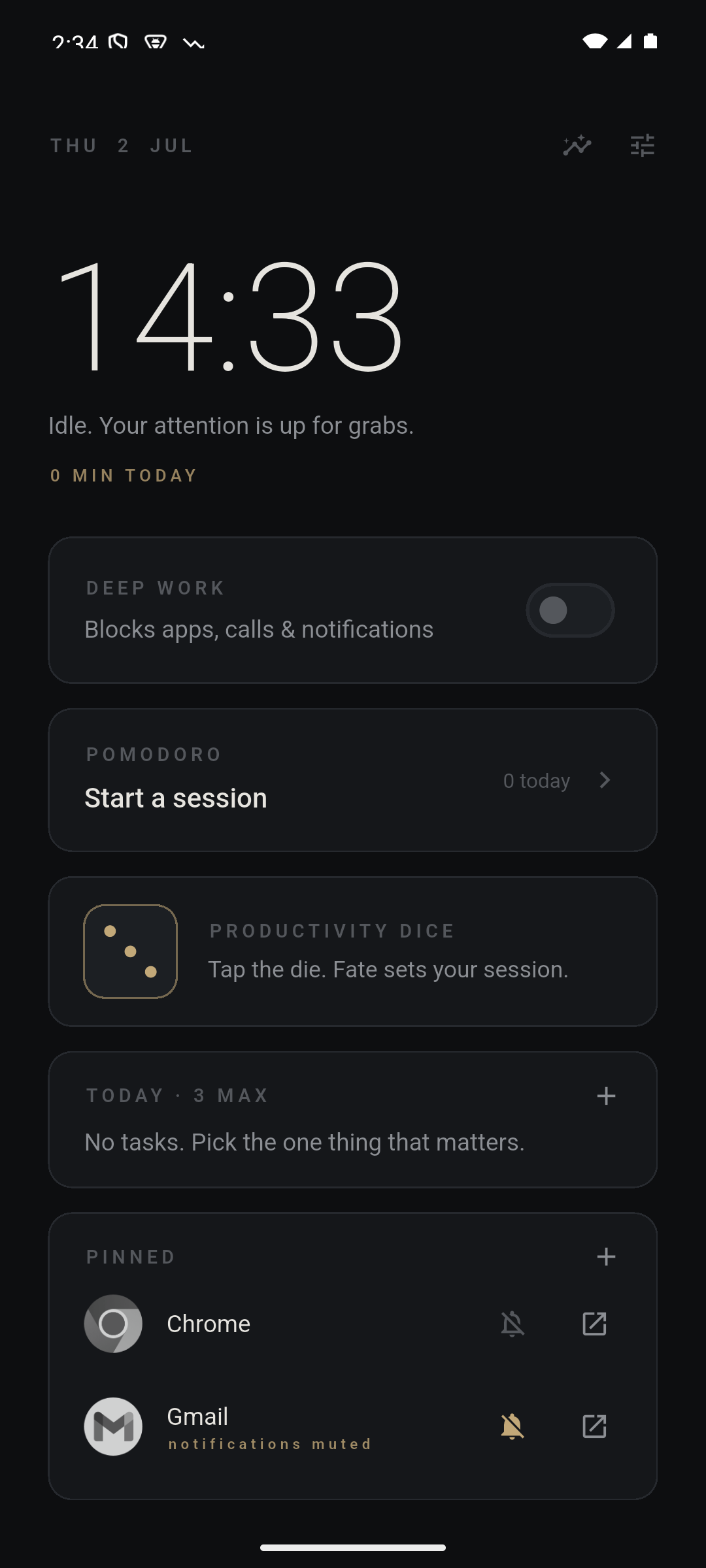
Mono home screen showing deep work switch, pomodoro timer, tasks, and pinned apps
47 sec
Average attention span before the mind wanders – down from 2.5 minutes in 2004
Source: Prof. Gloria Mark, UC Irvine (2023)
96×
Times the average person checks their phone each day. That's once every 10 waking minutes.
Source: Asurion survey, 2023
23 min
Time lost to regain deep focus after a single interruption – even a 3-second glance
Source: Gloria Mark, Microsoft Research

Every existing solution only patches one hole.

  • App blockers are bypassable in 2 taps. Delete the app, uninstall, toggle off Screen Time – your brain finds the loophole within a week. Forest, One Sec, Opal: all defeated by a determined mind.
  • Pomodoro apps don't block anything. A growing tree doesn't stop you from opening Instagram. You need a timer AND enforcement.
  • You're managing 3–5 separate apps. A timer, a blocker, a DND toggle, a launcher. They don't talk to each other. One breaks and the whole system collapses.
  • Friction habituates to zero. The "6-second breathing pause" that worked on Day 1 is autopilot by Day 14. You tap through it without thinking.
The Mono difference

One switch that does everything – together.

Mono lives at the OS level. It IS your home screen. When Deep Work flips on, blocking, DND, the timer, and grayscale all activate simultaneously – and the exit path requires deliberate effort.

Hard app blocking DND + call silencing Pomodoro timer Grayscale mode Notification digest Session streaks Productivity dice Strict mode + PIN

Flip one switch. Everything changes.

Deep Work mode is the heart of Mono. Everything below happens the moment you turn it on – no configuration, no juggling apps.

Hard blocking

They can't be opened. Even if you want to.

Mono uses Android's Usage Stats API to intercept any blocked app the instant it becomes foreground – not just hide it from the drawer. Open Instagram and you're yanked back immediately. Every dodged attempt is counted.

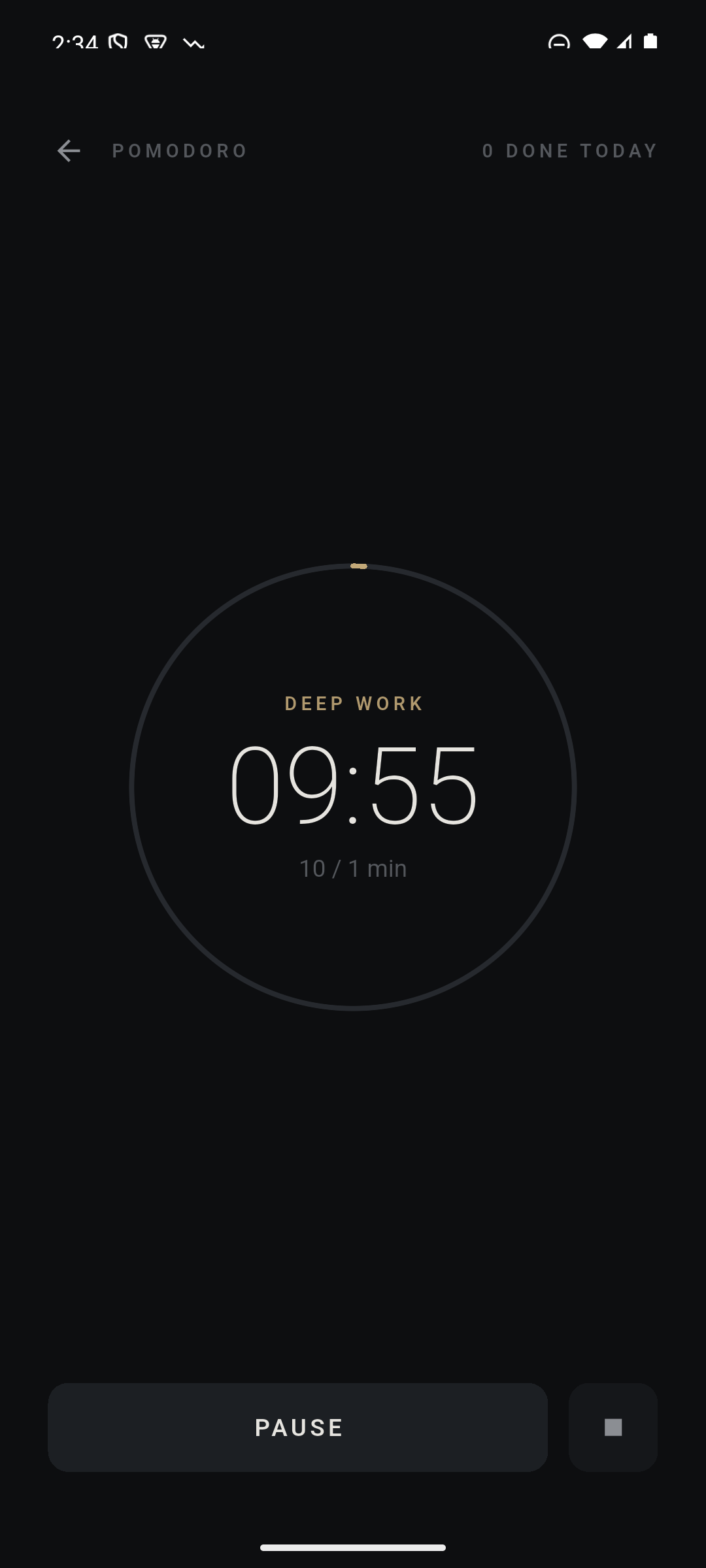
Pomodoro timer showing a deep work session in progress
Do Not Disturb

Calls and notifications go silent. Automatically.

Total silence, or Priority mode – starred contacts and repeat callers still reach you. No manual toggling. No forgetting to re-enable.

Productivity dice

Fate sets the session length.

Roll a 6: sixty minutes of work, six of rest. Unpredictability breaks the habituation that kills every other focus system.

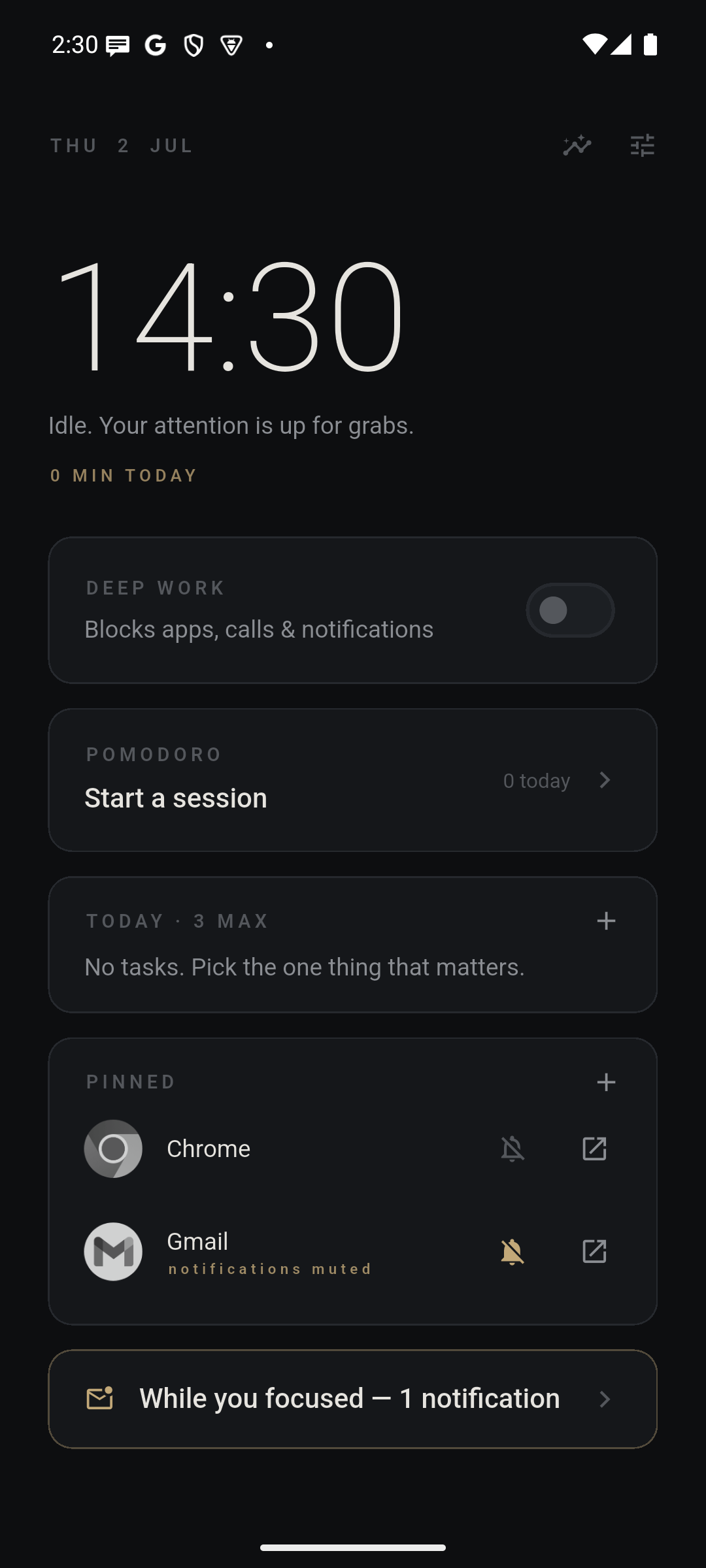
Focus digest showing notifications caught during deep work, with pinned apps below
14
Streaks & stats

Make the habit visible.

Minutes per day, sessions completed, interruptions dodged, and a 7-day bar chart. Fourteen-day streak means fourteen consecutive days you chose your work over your feed.

Notification digest

Nothing gets lost. Everything waits.

Every notification that arrived while you focused is stored and replayed as a digest when the session ends. Silence now – fully caught up later. No FOMO, no exceptions.

Built for people who ship.

Strict mode + exit PIN

A running session cannot be ended early – unless you enter the PIN you set before it started. Commitment, not willpower.

Scheduled deep work

Set weekday hours once. Sessions start themselves. Monday at 9:00 is always a focused morning – whether you remember or not.

Grayscale on focus

The screen drains to monochrome the moment your session starts. Color is a dopamine lever. Remove it.

Three tasks maximum

The home screen holds three tasks and refuses a fourth. Backlogs are a tomorrow problem. Today has three jobs.

Session intention

Write what this session is for before it starts. It stays on screen during the timer. Vague sessions produce vague results.

Pinned apps with mute switch

The 3–5 apps you actually need sit on your home screen in greyscale, each with its own notification kill-switch.

Focus audio PRO

Brown noise, rain, or lo-fi plays during work phases and pauses automatically on breaks. Pairs with strict mode for zero exits, zero distractions.

Android and iOS – different superpowers.

Android

Home screen replacement

Mono IS your launcher. No feed, no app grid, no rabbit holes – just the timer, your intention, and a minimal dock. App blocking works system-wide via overlay, even outside the app.

Replaces home screen System-wide blocking Grayscale mode Battery-exempt service
iOS

Screen Time companion

iOS doesn't allow third-party home screen replacements – so Mono works differently here. It uses Apple's Family Controls API to apply kernel-level app shields during sessions. A custom block screen appears the moment you try to open a shielded app. Pair with a Shortcuts Focus mode for full system silence.

No home screen replacement on iOS – Apple restricts this. Mono is a companion app, not a launcher.
Kernel-level shields Custom block screen Screen Time API Shortcuts integration

Why other apps fail you.

The focus app market has one structural flaw: every competitor solves one layer. Mono is the only tool that does all five simultaneously.

Feature Mono Opal Forest One Sec Digital Wellbeing
Hard app blocking (not just hiding) ✓ Yes iOS only ✗ No ✗ No Bypassable
Built-in Pomodoro timer ✓ Yes ✗ No Session only ✗ No ✗ No
Automatic DND + call silencing ✓ Yes ✗ No ✗ No ✗ No Separate setting
Grayscale tied to session ✓ Yes ✗ No ✗ No ✗ No Manual only
Notification digest ("while you focused") ✓ Yes ✗ No ✗ No ✗ No ✗ No
Android & iOS native ✓ Both iOS only Both Both Built-in
Scheduled auto-start sessions ✓ Pro Paid only ✗ No ✗ No ✗ No
Price Free + 30d trial $99/year $2.99 $19.99/year Free
Zero data collection ✓ Yes Analytics Limited Limited Google data

Mono vs Opal

Opal is the gold standard on iOS — beautiful, hard-blocking, $99/year. But Opal is iOS-only. Android users have had no equivalent. Mono fills that gap: system-level app blocking, a Pomodoro timer, and automatic DND built into a launcher that becomes your home screen. Free to start, 30-day Pro trial then $3.49/year.

Mono vs Forest

Forest grows a tree while your phone sits idle. The problem: it cannot prevent you from opening Instagram. A determined mind sacrifices the tree every time. Mono intercepts blocked apps before they load using Android's Usage Stats API — there is no loophole. You cannot open what you blocked.

Mono vs One Sec

One Sec adds a 1-second breathing pause before you open a distracting app — clever, but friction habituates. By week 3 your thumb taps through the pause on autopilot. Mono removes the option entirely for the session duration. You can't tap through a block that doesn't let you in at all.

Mono vs Digital Wellbeing

Digital Wellbeing app timers are bypassable in two taps: just extend the limit or turn it off. Mono's session blocking lives at the launcher level — below the Settings menu that would let you bypass it. With Strict Mode on, even ending a session early requires the PIN you set before you started.

Set up once. Protect your work every day.

1

Install & blocklist

Add Mono as your home screen. Add the 3–5 apps that pull you out of work (WhatsApp, Instagram, YouTube). Set your working hours.

2

Flip Deep Work on

One toggle. Blocked apps vanish, phone goes silent, Pomodoro timer starts, screen drains to grey. You are now unreachable by distraction.

3

Review & streak

Session ends. Your notification digest appears – everything that arrived while you were working. Stats update. Streak continues. Ship.

"The goal isn't a blocker that makes Instagram harder to open. It's a phone that makes deep work structurally easier than distraction."

The Mono philosophy – built for founders, developers, and writers who ship

"Your attention is the only truly nonrenewable resource. Every app on your phone was built by a team whose sole job is to harvest it. Mono is the only thing fighting back."

On why this exists – and why a launcher, not a blocker overlay, is the right level to fight at

You pay us when you buy. That's the whole deal.

No ads. No analytics. No data collection. Mono Pro is free for 30 days – then $3.49/year, less than a coffee. The core app is free forever.

Nothing leaves your phone

All data – sessions, stats, tasks, blocklist, notification digest – lives in private storage on your device. Uninstall and it's gone. No servers, no cloud, no accounts.

Honest pricing

The core app is free. Mono Pro – focus audio, scheduled sessions, strict mode PIN – starts with a 30-day free trial, then $3.49/year (₹179/year in India). Cancel before the trial ends and you won't be charged.

No ads. Ever.

An anti-distraction launcher that shows ads would be a joke. This is a focus tool. The entire product is built on the premise that your attention is yours.

Common questions

Everything people search before they install.

Is there an Opal alternative for Android?

Yes — Mono is the closest Android equivalent to Opal. Opal is iOS-only and costs $99/year. Mono brings the same hard app blocking philosophy to Android using the Usage Stats API: blocked apps are intercepted the instant they become foreground — not just hidden. Add a built-in Pomodoro timer, automatic Do Not Disturb, grayscale mode, and a notification digest, and you get more than Opal — with a 30-day free trial, then $3.49/year.

Does Forest block apps on Android?

No. Forest grows a virtual tree while your phone sits idle, but it cannot prevent you from opening Instagram or YouTube. A motivated person sacrifices the tree and opens the app. Mono blocks at the Android system level via an overlay service — blocked apps cannot be opened during a session, even if you actively try.

What is the difference between Mono and One Sec?

One Sec adds a 1-second breathing pause before you open a distracting app. It creates friction, which helps — for a while. By week 3 most users tap through the pause on autopilot. Mono removes the option entirely for the session duration: blocked apps cannot be opened at all, and there is no pause to habituate to. Mono also adds a Pomodoro timer, automatic DND, and grayscale mode.

What is a deep work launcher for Android?

A deep work launcher replaces your standard Android home screen with one designed for output rather than consumption. Instead of an app grid, infinite scroll, and notification widgets, you get a focus timer, a session intention field, and hard-blocked distracting apps. Mono is built around the principle that blocking should happen at the lowest possible level — the home screen — not in an overlay you can close.

Is Mono better than Digital Wellbeing or Screen Time for blocking apps?

Significantly. Digital Wellbeing's app timers can be bypassed in two taps: open Settings, extend the limit, done. Mono's session blocking lives at the launcher level — not in a Settings menu. With Strict Mode and a PIN enabled, you cannot end a running session without the code you set before it started. You'd have to fully reboot the device to escape.

How do I block distracting apps during work on Android?

Install Mono and set it as your default Android launcher. Add the apps you want to block (Instagram, YouTube, WhatsApp, Reddit) to your blocklist. Tap the Deep Work toggle. Blocked apps are intercepted immediately — any attempt to open them redirects back to Mono. The blocking persists until you end the session or it times out naturally.

What Android permissions does Mono require?

Four permissions: Usage Access (detects when you try to open a blocked app), Display Over Other Apps (shows the block overlay), Notification Listener (stores your notification digest during focus), and Do Not Disturb Access (silences calls and alerts). No network, no location, no contacts. Everything stays on your device — Mono has no servers.

Is Mono free? What does Pro include?

Core Mono — hard app blocking, Pomodoro timer, auto DND, grayscale, notification digest, session streaks — is free forever. Mono Pro starts with a 30-day free trial, then $3.49/year (₹179/year in India). Cancel any time before the trial ends and you won't be charged. Pro adds three things: focus audio (brown noise, rain, or lo-fi that plays during work and pauses on breaks), scheduled sessions that start automatically on your chosen days and times, and strict mode with an exit PIN.

Your next session starts when you want it to. Not when the feed lets you.

Install Mono and experience a phone that works for you instead of against you. Free to start. No account required. Android 8+ and iOS 16+.

  • Replaces your home screen – no separate launcher
  • Blocks apps system-wide, not just hides them
  • Pomodoro + DND + grayscale in one switch
  • Notification digest – nothing missed, nothing interrupting
  • Streaks and stats for the habit to stick
  • Strict mode + PIN for the days you need it most
  • No data, no account, no subscription required